@tesicg wrote:
I have 2 elements. Each element has 2 ports of different type. The code looks as following:
myDiagram.linkTemplate =
    $(go.Link,
    {
        relinkableFrom: true, relinkableTo: true,
        selectionAdorned: false, // Links are not adorned when selected so that their color remains visible.
        shadowOffset: new go.Point(0, 0), shadowBlur: 5, shadowColor: "black"
    },
    new go.Binding("isShadowed", "isSelected").ofObject(),
    $(go.Shape,
        { name: "SHAPE", strokeWidth: 2, stroke: black }));

function portStyle0(input) {
    return {
        desiredSize: new go.Size(3, 3),
        fill: "black",
        fromLinkable: !input,
        toLinkable: input,
        cursor: "pointer"
    };
}

function portStyle1() {
    return {
        desiredSize: new go.Size(3, 3),
        fill: "black",
        toLinkable: true,
        cursor: "pointer",
        fromLinkable: true,
        fromSpot: go.Spot.TopBottomSides,
        toSpot: go.Spot.TopBottomSides
    };
}

var image4Template =
    $(go.Node, "Vertical", nodeStyle(),
    $(go.Shape, "Rectangle", portStyle0(false),  // the only port
        { portId: "", alignment: new go.Spot(0.12, 0) }),
    $(go.Picture, "Images/ElectricalElements/Sec_1.svg"),
    $(go.Shape, "Rectangle", portStyle1(),  // the only port
        { portId: "", alignment: new go.Spot(0.12, 0) })
    );

var image5Template =
    $(go.Node, "Vertical", nodeStyle(),
    $(go.Shape, "Rectangle", portStyle0(true),  // the only port
        { portId: "", alignment: new go.Spot(0.525, 0) }),
    $(go.Picture, "Images/ElectricalElements/Sec_2.svg"),
    $(go.Shape, "Rectangle", portStyle1(),  // the only port
        { portId: "", alignment: new go.Spot(0.525, 0) })
    );
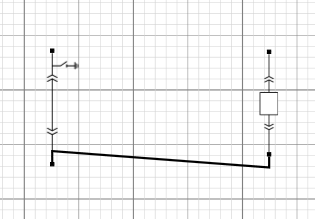
When I try to connect upper ports from left to right element I've got the following diagram (correct!):
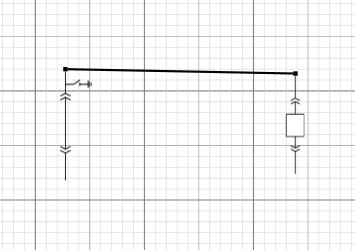
When I remove lower ports I've got the following diagram (incorrect!):
I need the elements with different types of ports, but I'm not sure what's wrong in my case.
Posts: 2
Participants: 2