@cfarmerga wrote:
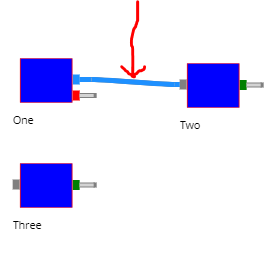
I'd like to be able to click and drag from any point on an existing link (the selected link in my first screenshot for example) and in the process initiate creation of a new link as if it were drawn from the blue port at the left end of the link. My goal here is to click-drag from the selected link to the port on the left of node "three", while having the linking tool show the temporary link while I'm dragging.
I thought I could use the code suggested at the top of the LinkingTool help page, and I put it in mouseDragLeave for the link:
mouseDragLeave: function (evt, link, b) {
    var tool = diagram.toolManager.linkingTool;
    tool.startObject = link.fromPort;
    diagram.currentTool = tool;
    tool.doActivate();
}
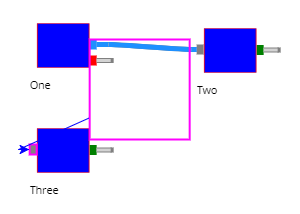
This seems to work in a simple jsfiddle (https://jsfiddle.net/cfarmerga/jpkao3d1/1/), but not in my larger app. Weird things happen. When I start the drag, I get a large magenta square drawn which seems to be topleft anchored on my fromPort of interest. Then the temporary link seems to be drawn from the center of this large square, when I really want it drawn from the small blue port at the right of node "one". When I actually do make a link connection here, the connectivity looks correct, and "one" and "three" then are connected, but it's the linking tool process that has me confused. I don't know what I might have changed to cause this linkingtool behavior. What should I look into changing to get the tool link drawn from my real fromPort instead of this large box?
Posts: 1
Participants: 1