@darioschmidt wrote:
Hi, i am trying to generate a template to show a node with this content:
* a shape
* a text that can be positioned in the top, center or bottom of the shape
* a dynamic number of ports, represented by a circleThe code that i am using is
templateMap.add('geometry',
            $(go.Node, this.nodeStyle(),
                $(go.Panel, 'Spot',
                    $(go.Shape, this.shapeGeometryStyle()),
                    $(go.TextBlock, this.textBlockStyle()),
                ),
                new go.Binding('itemArray', 'ports'),
                {
                    itemTemplate: $(go.Panel, 'Spot',
                        new go.Binding('pordId', 'name'),
                        new go.Binding('fromSpot', 'fromSpot', go.Spot.parse),
                        new go.Binding('toSpot', 'toSpot', go.Spot.parse),
                        new go.Binding('fromLinkable', '', ((port: ShapePort) => {
                            switch (port.type) {
                                case PortType.Input:
                                    return false;
                                case PortType.Output:
                                case PortType.InputOutput:
                                    return true;
                            }
                        })),
                        new go.Binding('toLinkable', '', ((port: ShapePort) => {
                            switch (port.type) {
                                case PortType.Output:
                                    return false;
                                case PortType.Input:
                                case PortType.InputOutput:
                                    return true;
                            }
                        })),
                        new go.Binding('alignment', 'alignment', go.Spot.parse),
                        $(go.Shape, 'Circle', this.portStyle())
                    )
                },
            )
        );

private nodeStyle() {
    return [
        {
            type: go.Panel.Spot,
            selectionAdorned: false,
            shadowOffset: new go.Point(0, 0),
            shadowBlur: 15,
            shadowColor: 'blue',
            resizable: true,
            resizeObjectName: 'NODESHAPE',
            locationObjectName: 'NODESHAPE',
            selectionObjectName: 'NODESHAPE',
            locationSpot: go.Spot.Center,
            cursor: 'move'
        },
        new go.Binding('location', 'location', go.Point.parse).makeTwoWay(go.Point.stringify),
        new go.Binding('isShadowed', 'isSelected').ofObject()
    ];
}

private shapeGeometryStyle() {
    return [
        {
            name: 'NODESHAPE',
            fill: '#ffffff',
            stroke: '#000000',
            strokeWidth: 0.80,
            strokeCap: 'round',
            strokeJoin: 'round',
            geometryStretch: go.GraphObject.Uniform
        },
        new go.Binding('geometryString', 'figure'),
        new go.Binding('width', 'width').makeTwoWay(),
        new go.Binding('height', 'height').makeTwoWay()
    ];
}

private textBlockStyle() {
    return [
        {
            font: 'bold 11pt helvetica, bold arial, sans-serif',
            margin: 20,
            editable: true,
            textAlign: 'center',
            _isNodeLabel: true,
            alignment: new go.Spot(0.5, 0.5, 0, 0)
        },
        new go.Binding('alignment', 'labelOffset', go.Spot.parse).makeTwoWay(go.Spot.stringify),
        new go.Binding('text', 'name')
    ];
}

private portStyle() {
    return [
        {
            desiredSize: new go.Size(10, 10),
            fill: 'red',
            stroke:  'black',
            toMaxLinks: 1,
            cursor: 'pointer'
        },
    ];
}

private getLabelOffset(shape: Shape): string {
    switch (shape.textPosition) {
        case ShapeTextPosition.Bottom:
            return '0.5 1 0 20';
        case ShapeTextPosition.Top:
            return '0.5 0 0 -20';
        case ShapeTextPosition.Center:
            return '0.5 0.5 0 0';
        case ShapeTextPosition.None:
            return '0.5 0.5 0 0';
    }
}
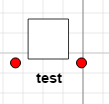
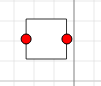
The text position is OK, in relation with the shape. But the ports are not shown correctly
If i remove the spot panel that contains the shape and the textblock, the ports are shown OK, but the textblock disappear.
If i change the spot type from 'Spot' to 'Auto', the position of the text is invalid (i think that is OK, considering the definition of a auto Panel)
Thanks,
Dario

Posts: 3
Participants: 2