@shantanoo-desai wrote:
Does the
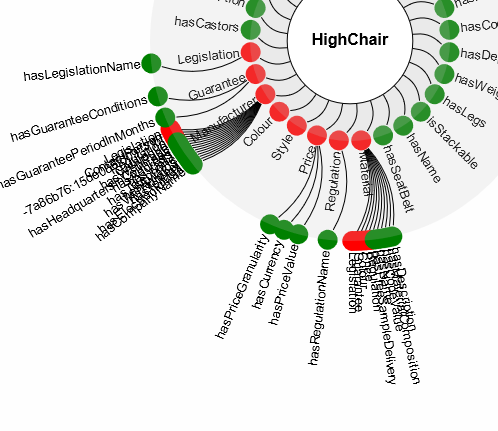
Layeror theDiagramAPI need to be checked for the RadialLayout spacing between nodes on different layers?Example
As you can see the second layer nodes are quite congested within themselves and would be great to see them apart.
The code is similar to the example on the website (written in Typescript)
this.myDiagram = this.$(go.Diagram, this.div.nativeElement,
    {
        initialContentAlignment: go.Spot.Center,
        padding: 10,
        isReadOnly: true,
        'animationManager.isEnabled': false, // disable Animation
        'allowVerticalScroll': false, // no vertical scroll for diagram
        'toolManager.mouseWheelBehavior': go.ToolManager.WheelNone // do not zoom diagram on wheel scroll
    });
this.myDiagram.addLayerBefore(this.$(go.Layer, { name: 'red' }), this.myDiagram.findLayer('Grid'));
this.myDiagram.addLayerBefore(this.$(go.Layer, { name: 'green' }), this.myDiagram.findLayer('Grid'));
let commonToolTip = this.$(go.Adornment, 'Auto',
    {
        isShadowed: true
    },
    this.$(go.Shape, { fill: '#FFFFCC' }),
    this.$(go.Panel, 'Vertical',
        {
            margin: 3
        },
        this.$(go.TextBlock,  // bound to node data
            {
                margin: 4, font: 'bold 12pt sans-serif'
            },
            new go.Binding('text')),
        this.$(go.TextBlock,  // bound to Adornment because of call to Binding.ofObject
            new go.Binding('text', '',
                (ad) => {
                    return 'Connections: ' + ad.adornedPart.linksConnected.count;
                }).ofObject())
    )  // end Vertical Panel
);  // end Adornment
this.myDiagram.nodeTemplate =
    this.$(go.Node, 'Spot',
        {
            locationSpot: go.Spot.Center,
            locationObjectName: 'SHAPE',  // Node.location is the center of the Shape
            selectionAdorned: true,
            click: (e: go.InputEvent, obj: go.GraphObject): void => { this.nodeClicked(e, obj); },
            toolTip: commonToolTip,
        },
        this.$(go.Shape, 'Circle',
            {
                name: 'SHAPE',
                fill: 'lightgray',  // default value, but also data-bound
                stroke: 'transparent',
                strokeWidth: 2,
                desiredSize: new go.Size(20, 20),
                portId: ''  // so links will go to the shape, not the whole node
            },
            new go.Binding('fill', 'color')),
        this.$(go.TextBlock,
            {
                name: 'TEXTBLOCK',
                alignment: go.Spot.Right,
                alignmentFocus: go.Spot.Left
            },
            new go.Binding('text')),
            new go.Binding('layerName', 'color')
    );

// this is the root node, at the center of the circular layers
this.myDiagram.nodeTemplateMap.add('Root',
    this.$(go.Node, 'Auto',
        {
            locationSpot: go.Spot.Center,
            selectionAdorned: true,
            toolTip: commonToolTip
        },
        this.$(go.Shape, 'Circle',
            { fill: 'white' }),
        this.$(go.TextBlock,
            { font: 'bold 12pt sans-serif', margin: 5 },
            new go.Binding('text'))
    ));

// define the Link template
this.myDiagram.linkTemplate =
    this.$(go.Link,
        {
            routing: go.Link.Normal,
            curve: go.Link.Bezier,
            selectionAdorned: false,
            layerName: 'Background'
        },
        this.$(go.Shape,
            {
                stroke: 'black',  // default value, but is data-bound
                strokeWidth: 1
            },
            new go.Binding('stroke', 'color'))
    );
Posts: 1
Participants: 1