@Dor wrote:
Hi,
After looking at the example of dynamic pie chart
https://gojs.net/latest/samples/dynamicPieChart.html
Iv'e created this node template:myDiagram.nodeTemplateMap.add("StatesNode", $(go.Node, "Horizontal", nodeStyle(), new go.Binding("visible", "", (data) => data.isVisible ? data.isVisible : false), $(go.Panel, "Spot", $(go.Panel, new go.Binding("itemArray", "", createStateNodeItemArray), { itemTemplate: $(go.Panel, $(go.Shape, { name: "Arc", isGeometryPositioned: true, strokeWidth: 0, stroke: null }, new go.Binding("fill", "color"), new go.Binding("geometry", "", createSlice) ) ) } ) ) ) );With the create Slice function:
function createSlice(data) {
    return new go.Geometry()
            .add(new go.PathFigure(data.radius, data.radius)  // start point
                .add(new go.PathSegment(go.PathSegment.Arc,
                                        data.start, data.sweepAngle,  // angles
                                        data.radius, data.radius,  // center
                                        data.radius, data.radius)  // radius
                    .close()));
}
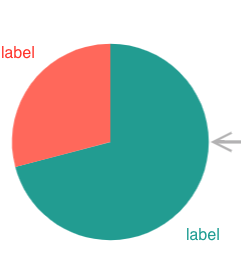
Is there a way to align text blocks according to the slices of the pie (centered with offset computed by the pie angle)?
Looked at the radial partition example but I would like to not split the slices of the pie to different nodes. https://gojs.net/latest/samples/radialPartition.html.An example of the desired outcome:
Posts: 1
Participants: 1