@shashi1 wrote:
Hello ,
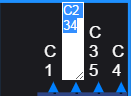
I am using Gojs Text block editable it showing white background
then I include the code texteditor.js having following code// HTML + JavaScript text editor menu, made with HTMLInfo // This is a re-implementation of the default text editor // This file exposes one instance of HTMLInfo, window.TextEditor // See also TextEditor.html (function(window) { var textarea = document.createElement('textarea'); textarea.id = "myTextArea"; textarea.addEventListener('input', function(e) { var tool = TextEditor.tool; if (tool.textBlock === null) return; var tempText = tool.measureTemporaryTextBlock(this.value); var scale = this.textScale; this.style.width = 20 + tempText.measuredBounds.width * scale + 'px'; this.style.height = 10 + tempText.measuredBounds.height * scale + "px"; this.rows = tempText.lineCount; }, false); textarea.addEventListener('keydown', function(e) { var tool = TextEditor.tool; if (tool.textBlock === null) return; var keynum = e.which; if (keynum === 13) { // Enter if (tool.textBlock.isMultiline === false) e.preventDefault(); tool.acceptText(go.TextEditingTool.Enter); return; } else if (keynum === 9) { // Tab tool.acceptText(go.TextEditingTool.Tab); e.preventDefault(); return; } else if (keynum === 27) { // Esc tool.doCancel(); if (tool.diagram !== null) tool.diagram.doFocus(); } }, false); // handle focus: textarea.addEventListener('focus', function(e) { var tool = TextEditor.tool; if (tool.currentTextEditor === null) return; if (tool.state === go.TextEditingTool.StateActive) { tool.state = go.TextEditingTool.StateEditing; } if (tool.selectsTextOnActivate) { textarea.select(); textarea.setSelectionRange(0, 9999); } }, false); // Disallow blur. // If the textEditingTool blurs and the text is not valid, // we do not want focus taken off the element just because a user clicked elsewhere. textarea.addEventListener('blur', function(e) { var tool = TextEditor.tool; if (tool.currentTextEditor === null) return; textarea.focus(); if (tool.selectsTextOnActivate) { textarea.select(); textarea.setSelectionRange(0, 9999); } }, false); var TextEditor = new go.HTMLInfo(); TextEditor.valueFunction = function() { return textarea.value; } TextEditor.mainElement = textarea; // to reference it more easily // used to be in doActivate TextEditor.show = function(textBlock, diagram, tool) { if (!(textBlock instanceof go.TextBlock)) return; TextEditor.tool = tool; // remember the TextEditingTool for use by listeners // This is called during validation, if validation failed: if (tool.state === go.TextEditingTool.StateInvalid) { textarea.style.border = '3px solid red'; textarea.focus(); return; } // This part is called during initalization: var loc = textBlock.getDocumentPoint(go.Spot.Center); var pos = diagram.position; var sc = diagram.scale; var textscale = textBlock.getDocumentScale() * sc; if (textscale < tool.minimumEditorScale) textscale = tool.minimumEditorScale; // Add slightly more width/height to stop scrollbars and line wrapping on some browsers // +6 is firefox minimum, otherwise lines will be wrapped improperly var textwidth = (textBlock.naturalBounds.width * textscale) + 6; var textheight = (textBlock.naturalBounds.height * textscale) + 2; var left = (loc.x - pos.x) * sc; var top = (loc.y - pos.y) * sc; textarea.value = textBlock.text; // the only way you can mix font and fontSize is if the font inherits and the fontSize overrides // in the future maybe have textarea contained in its own div diagram.div.style['font'] = textBlock.font; var paddingsize = 1; textarea.style.cssText = 'position: absolute;' + 'z-index: 100;' + 'font: inherit;' + 'fontSize: ' + (textscale * 100) + '%;' + 'lineHeight: normal;' + 'width: ' + (textwidth) + 'px;' + 'height: ' + (textheight) + 'px;' + 'left: ' + ((left - (textwidth / 2) | 0) - paddingsize) + 'px;' + 'top: ' + ((top - (textheight / 2) | 0) - paddingsize) + 'px;' + 'textAlign: ' + textBlock.textAlign + ';' + 'margin: 0;' + 'padding: ' + paddingsize + 'px;' + 'border: 0;' + 'color: white;' + 'background:black;'+ 'outline: none;' + 'white-space: pre-wrap;' + 'overflow: hidden;' // for proper IE wrap textarea.textScale = textscale; // attach a value to the textarea, for convenience // Show: diagram.div.appendChild(textarea); // After adding, focus: textarea.focus(); if (tool.selectsTextOnActivate) { textarea.select(); textarea.setSelectionRange(0, 9999); } }; TextEditor.hide = function(diagram, tool) { diagram.div.removeChild(textarea); TextEditor.tool = null; // forget reference to TextEditingTool } window.TextEditor = TextEditor; })(window); exports.customTextEditor = window.TextEditor; using in my component import {customTextEditor} from './script/TextEditor.js';and used this code
this.myDiagram.toolManager.textEditingTool.defaultTextEditor = customTextEditor;it is able to change the backgound color as per my requirement but editing this text box giving error which causing my Gojs unstable
any suggestion?
Posts: 2
Participants: 2