@ilyakut wrote:
Hello,
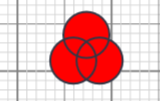
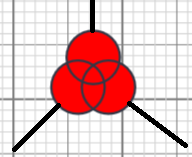
There is a Node that has Ports, and I need to connect the link to the edge of the Shape (of this Node), the Shape has not rectabgled form. Like this:how can I place ports to have links on this places:
I have tried to use:
diagram.nodeTemplateMap.add("Triple_tind_transformer",
        $$(go.Node, "Auto", nodeStyle(),
            { contextMenu: schemeMenu },
            {
                rotatable: true,
                locationSpot: go.Spot.Center,
                locationObjectName: "SHAPE",
                selectionObjectName: "SHAPE"
            },
            new go.Binding("location", "loc", go.Point.parse).makeTwoWay(go.Point.stringify),
            new go.Binding("angle").makeTwoWay(),
            $$(go.Panel,
            $$(go.Shape,
                {
                    geometry: Triple_tind_transformer, scale: 0.7,
                    name: "SHAPE", fill: "Red",
                    strokeWidth: 1.5, stroke: "#333745", strokeCap: "round", strokeJoin: "round",
                    //portId: "", fromLinkable: true,
                    //fromSpot: go.Spot.TopLeft
                    })),
            $$(go.Panel, "Table",
                $$(go.Panel, "Horizontal",
                    { column: 1, row: 1 },
                    $$(go.Shape,
                        { width: 6, height: 6, portId: "1", toSpot: go.Spot.Left, toLinkable: true }),
                    $$(go.TextBlock, "1")
                ),
                $$(go.Panel, "Horizontal",
                    { column: 2, row: 2 },
                    $$(go.Shape,
                        { width: 6, height: 6, portId: "2", toSpot: go.Spot.Left, toLinkable: true }),
                    $$(go.TextBlock, "2")
                )
            )
        ));
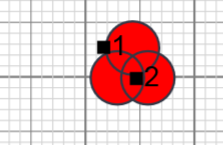
but the "Table" has too big spaces between the rows and columns and I can't place ports in the location that I need. Like this:
Posts: 6
Participants: 2