@jothibaskaran wrote:
Hi,
This is the structure of my links:
$(go.Link,
            {
                routing: go.Link.AvoidsNodes,
                curve: go.Link.Bezier,
                adjusting: go.Link.Stretch,
                relinkableFrom: true,
                relinkableTo: true,
                reshapable: true,
                resegmentable: true,
                deletable: false,
                contextMenu:
                    $('ContextMenu',
                    $('ContextMenuButton',
                    { 'ButtonBorder.fill': 'white', '_buttonFillOver': 'lightgray' },
                        $(go.TextBlock, 'Delete',
                        { margin: 12 }
                        ),
                        {
                            click: (e, obj) => {
                                e.diagram.commit(function(d) {
                                d.remove(obj.part.adornedPart);
                                });
                                this.propertiesFlagEvent.emit('');
                                this.save();
                            },
                        },
                    )
                    )
            },
            $(go.Shape)  // the arrowhead
        );
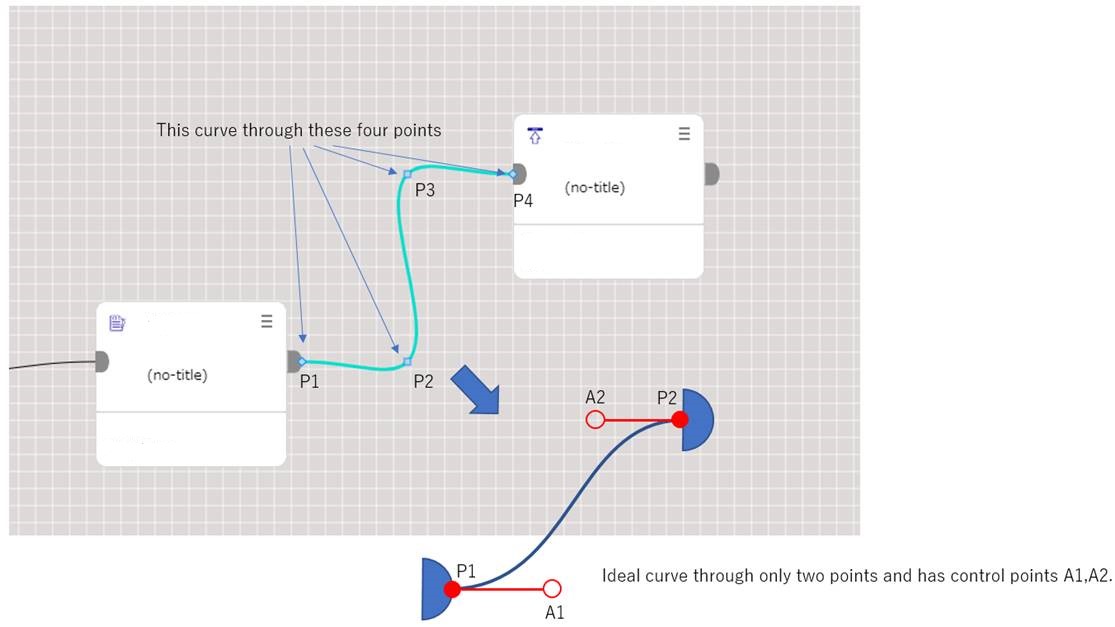
This generates links with a Bezier curve with the points- P1, P2, P3, P4 as shown in the picture below:
I want to change the curve to the scenario shown in dark blue in the image, i.e., a curve with 2 points - P1 and P2. And control points A1 and A2.
How can this be done?
Posts: 1
Participants: 1