@macadameane wrote:
Hello! Our team has been using a group template for quite sometime. Recently, we decided to make a slight modification for a different layout in some cases. To reuse the code, I pulled out some common stuff, but this resulted in a different rendering. I’m not very experienced with GoJS, so it may be that something makes this not allowed. Below is the code and how it is rendered for the each variation:
Original Code
    orgGroupTemplate =
        GO(go.Group, "Auto",
            GO(go.Shape, "Rectangle", shapeParameters),
            GO(go.Panel, "Vertical",
                { defaultAlignment: go.Spot.Left },
                GO(go.Panel, "Horizontal",
                    { defaultAlignment: go.Spot.Top },
                    GO("SubGraphExpanderButton"),
                    GO(go.TextBlock, { name: "GROUPTEXT", alignment: go.Spot.TopLeft, alignmentFocus: new go.Spot(0, 0, 4, 4), font: "Bold 10pt Sans-Serif" }, new go.Binding("text", "name"))
                ),
                GO(go.Placeholder, { padding: 20 })
            ),
            {
                contextMenu: GO(go.Adornment, "Vertical",
                    GO("ContextMenuButton", GO(go.TextBlock, "Organization View"), { click: jumpToGraph })
                )
            },
            {
                toolTip: toolTip
            },
            {
                click: showProperties
            }
        );
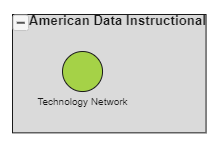
How it displays
Modified Code
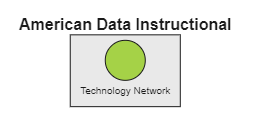
var collapsibleGroupLabel = GO(go.Panel, "Vertical", { defaultAlignment: go.Spot.Left }, GO(go.Panel, "Horizontal", { defaultAlignment: go.Spot.Top }, GO("SubGraphExpanderButton"), GO(go.TextBlock, { name: "GROUPTEXT", alignment: go.Spot.TopLeft, alignmentFocus: new go.Spot(0, 0, 4, 4), font: "Bold 10pt Sans-Serif" }, new go.Binding("text", "name")) ), GO(go.Placeholder, { padding: 20 }) ); let shapeParameters = { name: "OBJSHAPE", parameter1: 10, fill: "rgba(128,128,128,0.33)" }; orgGroupTemplate = GO(go.Group, "Auto", GO(go.Shape, "Rectangle", shapeParameters), collapsibleGroupLabel, { contextMenu: GO(go.Adornment, "Vertical", GO("ContextMenuButton", GO(go.TextBlock, "Organization View"), { click: jumpToGraph }) ) }, { toolTip: toolTip }, { click: showProperties } );How it displays
Posts: 4
Participants: 2