@warren.reed wrote:
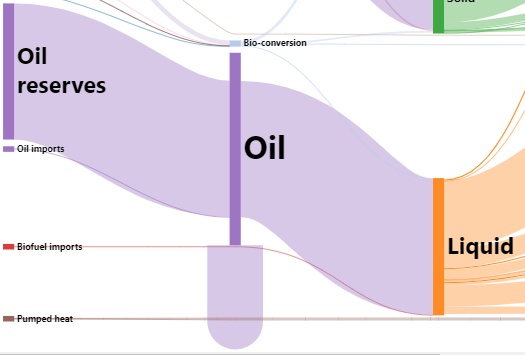
I’m trying to build my own Sankey diagram based on the sample at https://gojs.net/latest/samples/sankey.html. However, I can’t get reflexive links to display correctly. I added a reflexive link to the Oil node and it looks like this:
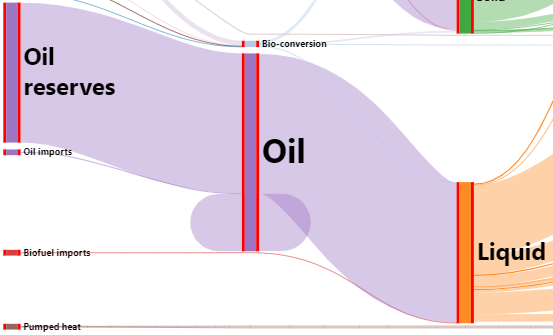
I would like the link to exit the node on the right-hand side, wrap around the node, and enter on the left-hand side. I added my own input port on the left and output port on the right (red) and this is what it looks like:
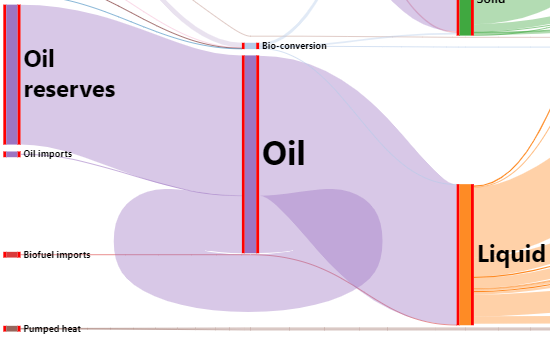
The link is exiting the right and entering the left but its not wrapping around the node. I changed the routing for reflexive links to be orthogonal and this is what it looks like:
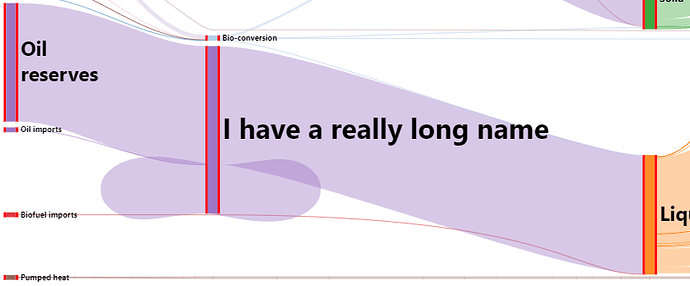
This is close to what I want but the wrapping doesn’t work if the node text is long. I lengthened the text of the Oil node and this is what it looks like:
Now the link isn’t wrapping around the node anymore.
Does anybody know how to get the link to wrap around the node? I’m using GoJS 2.1. Thank you
Here are my code changes for the sample:
// Before creating the LayeredDigraphNetwork of vertexes and edges,
// determine the desired height of each node (Shape).
SankeyLayout.prototype.createNetwork = function () {
  this.diagram.nodes.each(function (node) {
    var height = getAutoHeightForNode(node);
    var font = "bold " + Math.max(12, Math.round(height / 8)) + "pt Segoe UI, sans-serif"
    var shape = node.findObject("SHAPE");
    var text = node.findObject("TEXT");
    var ltext = node.findObject("LTEXT");
    if (shape) shape.height = height;
    if (text) text.font = font;
    if (ltext) ltext.font = font;

    // *** I added this to update the heights of the ports to match the main shape.
    var input = node.findObject("INPUT");
    var output = node.findObject("OUTPUT");
    if (input) input.height = height;
    if (output) output.height = height;
  });
  return go.LayeredDigraphLayout.prototype.createNetwork.call(this);
};

// define the Node template
myDiagram.nodeTemplate =
  $(go.Node, go.Panel.Horizontal,
    {
      locationObjectName: "SHAPE",
      locationSpot: go.Spot.MiddleLeft,
      portSpreading: go.Node.SpreadingPacked  // rather than the default go.Node.SpreadingEvenly
    },
    $(go.TextBlock, textStyle(),
      { name: "LTEXT" },
      new go.Binding("text", "ltext")),
    // *** My custom input port
    $(go.Shape,
      {
        name: "INPUT",
        fill: "red",
        strokeWidth: 0,
        portId: "in",
        toSpot: go.Spot.LeftSide,
        height: 50,
        width: 5
      }),
    $(go.Shape,
      {
        name: "SHAPE",
        figure: "Rectangle",
        fill: "#2E8DEF",  // default fill color
        stroke: null,
        strokeWidth: 0,
        portId: "",
        fromSpot: go.Spot.RightSide,
        toSpot: go.Spot.LeftSide,
        height: 50,
        width: 20
      },
      new go.Binding("fill", "color")),
    // *** My custom output port
    $(go.Shape,
      {
        name: "OUTPUT",
        fill: "red",
        strokeWidth: 0,
        portId: "out",
        fromSpot: go.Spot.RightSide,
        height: 50,
        width: 5
      }),
    $(go.TextBlock, textStyle(),
      { name: "TEXT" },
      new go.Binding("text"))
  );

myDiagram.linkTemplate =
  $(go.Link, go.Link.Bezier,
    {
      selectionAdornmentTemplate: linkSelectionAdornmentTemplate,
      layerName: "Background",
      fromEndSegmentLength: 150, toEndSegmentLength: 150,
      adjusting: go.Link.End,
      // *** My custom ports
      fromPortId: 'out',
      toPortId: 'in'
    },
    // *** Change the routing for reflexive links
    new go.Binding("routing", "", function (linkData) {
      if (linkData.from === linkData.to) {
        return go.Link.Orthogonal;
      }

      return go.Link.None;
    }),
    $(go.Shape, { strokeWidth: 4, stroke: "rgba(173, 173, 173, 0.25)" },
      new go.Binding("stroke", "", getAutoLinkColor),
      new go.Binding("strokeWidth", "width"))
  );
Posts: 1
Participants: 1