@Jednorozec wrote:
Hello,
I’ve been implementing a selectionAdornmentTemplate in my project.
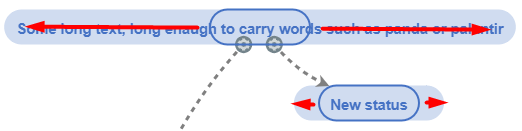
My target is to set selectionAdornment for Node, with RoundedRectangle Shape, with TextBlock in it. So the width of selectionAdornment needs to by dynamic and with Shape RoundedRectangle.
As you can see I need to use the selectionAdornment just like border around the node, but the width doesn’t seem to be dynamic.
Below is my Node definiton:
$(go.Node, 'Spot',
        {
          locationSpot: go.Spot.Center,
          cursor: 'pointer',
          selectionAdornmentTemplate:
            $(go.Adornment, 'Spot',
              $(go.Panel, 'Spot',
                $(go.Shape, 'RoundedRectangle',
                  {
                    fill: null,
                    strokeWidth: 2,
                    stroke: '#4572C4',
                    height: 35
                  }),
                $(go.Placeholder),
              ),
            ),
        },
        // two way location binding
        new go.Binding('location', 'loc', go.Point.parse).makeTwoWay(go.Point.stringify),
        $(go.Panel, 'Auto',
          $(go.Shape, 'RoundedRectangle',
            {
              strokeWidth: 0,
              stroke: '#e6e9ea',
              height: 35,
              minSize: new go.Size(150, 35),
            },
            new go.Binding('fill', 'color', (color: string) => {
              let R = parseInt(color.substring(1, 3), 16);
              let G = parseInt(color.substring(3, 5), 16);
              let B = parseInt(color.substring(5, 7), 16);
              return 'rgb(' + R + ', ' + G + ', ' + B + ', 0.25)';
            }),
          ),
          {
            cursor: 'pointer',
          },
          $(go.TextBlock, '',
            {
              editable: true,
              isMultiline: false,
              font: 'bold 11pt Lato, Helvetica, Arial, sans-serif',
              stroke: 'black',
            },
            new go.Binding('stroke', 'color'),
            new go.Binding('text').makeTwoWay(), {margin: 7}),
        ),
      ));
Would be grateful for any advice!
Best regards.
Posts: 5
Participants: 2