@sramanuj007 wrote:
Hi,
I need to resize a group based on number of nodes & links in the group dynamically.
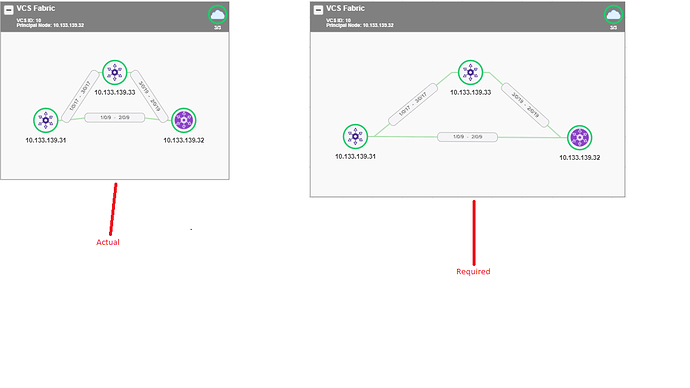
The user can still drag the placeholder but on first load the group must be displaying nodes and links with a proper spacing between them.
I modified the direction and columnSpacing attribute of Group.layout and it works fine. But I want it to happen dynamically rather than hardcoding it.$$(go.Group, "Auto", { layout: $$(go.LayeredDigraphLayout, { direction: 0, columnSpacing: 10 })}, $$(go.Shape, "Rectangle", // surrounds everything { strokeWidth: ngMapsThemes.default.group.strokeWidth.group }, new go.Binding("fill", "color"), new go.Binding("stroke", "color")), $$(go.Panel, "Vertical", // position header above the subgraph { defaultAlignment: go.Spot.Left }, $$(go.Panel, "Table", // the header { height: 50, defaultAlignment: go.Spot.Top, stretch: go.GraphObject.Horizontal }, $$("SubGraphExpanderButton", { margin: new go.Margin(5, 5, 0, 5), column: 0, alignment: go.Spot.TopLeft }), // this Panel acts as a Button $$(go.Panel, "Vertical", { column: 1, stretch: go.GraphObject.Horizontal }, $$(go.TextBlock, // group title near top, next to button { margin: new go.Margin(5,5,0,0), stroke: ngMapsThemes.default.group.stroke.text, font: ngMapsThemes.default.group.font.header, alignment: go.Spot.Left }, new go.Binding("text", "name")) ), $$(go.Panel, "Vertical", { alignment: go.Spot.Right, column: 2 }, $$(go.Panel, "Auto", { alignment: go.Spot.TopRight }, $$(go.Shape, "Circle", { width: ngMapsThemes.default.group.circle.width, height: ngMapsThemes.default.group.circle.height, strokeWidth: ngMapsThemes.default.group.strokeWidth.circle, fill : ngMapsThemes.default.group.fill, margin: ngMapsThemes.default.group.margin.circle, name:"FABRICCIRCLE" }), $$(go.Picture, { width: 25, height: 25 }, new go.Binding("source", "iconUrl") )), $$(go.TextBlock, new go.Binding("text", "fabricNodeCount"), { stroke: ngMapsThemes.default.group.stroke.text, font: ngMapsThemes.default.group.font.body, alignment: go.Spot.BottomCenter }) ) ), $$(go.Placeholder, // represents area for all member parts { padding: new go.Margin(40, 40), background: "rgba(249,249,249)" }) ), { selectionChanged: function(group) { var newLayer = group.isSelected ? "Foreground" : ""; group.layerName = newLayer; group.findSubGraphParts().each( function(member) { member.layerName = newLayer; }); } } );Attaching images for reference. Left one has nodes close to each other and links are not displayed with proper spacing. I needed the right image as the initial load output.
Any suggestions???
Posts: 1
Participants: 1