@ashish_singh wrote:
Hi,
I am evaluating GoJs and I am trying to add a palette to an Accordion.
I am using angular 9 and gojs-angular.
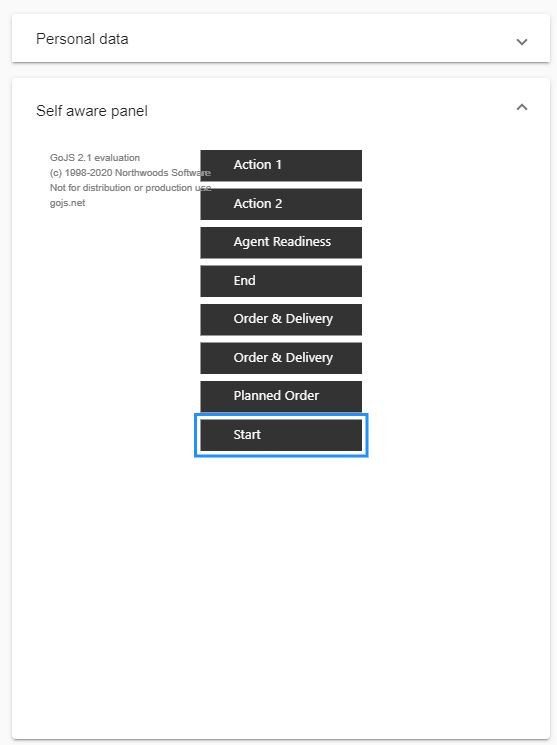
Working on Windows 10.I need to reduce the spacing between nodes in the palette. And i want nodes to be left aligned in the palette.
.
I referred Reducing space between nodes
and Reduce Space between 2 nodes in Palette .
But i don’t see the space minimizing.
  initPalette(): go.Palette {
    const $ = go.GraphObject.make;
    this.palette = $(go.Palette);


this.palette.nodeTemplate =$(go.Node, "Auto",
// for sorting, have the Node.text be the data.name
new go.Binding("text", "name"),
// bind the Part.layerName to control the Node's layer depending on whether it isSelected
new go.Binding("layerName", "isSelected", function(sel) { return sel ? "Foreground" : ""; }).ofObject(),
// define the node's outer shape
$(go.Shape, "Rectangle",
  {
    name: "SHAPE", fill: "#333333", stroke: 'white', strokeWidth: 3.5,
    // set the port properties:
    portId: "", fromLinkable: true, toLinkable: true, cursor: "pointer",
    margin: 0
  }),
$(go.Panel, "Horizontal",
  $(go.Picture,
    {
      name: "Picture",
      desiredSize: new go.Size(35,35)

    },
    new go.Binding("source", "key", findHeadShot)),
  // define the panel where the text will appear
  $(go.Panel, "Table",
    {
      minSize: new go.Size(130, NaN),
      maxSize: new go.Size(180, NaN),
      margin: new go.Margin(0, 0, 0, 0),
      defaultAlignment: go.Spot.Left
    },
    $(go.RowColumnDefinition, { column: 2, width: 2}),
    $(go.TextBlock, textStyle(),  // the name
      {
        row: 0, column: 0, columnSpan: 3,
        font: "10pt Segoe UI,sans-serif",
        editable: true, isMultiline: false,
        minSize: new go.Size(10, 16),
         margin: 0
      },
      new go.Binding("text", "name").makeTwoWay())

       )  // end Table Panel
     ) // end Horizontal Panel
   );  // end Node

    // This function provides a common style for most of the TextBlocks.
       // Some of these values may be overridden in a particular TextBlock.
       function textStyle() {
         return { font: "8pt  Segoe UI,sans-serif", stroke: "white" };
       }

  // This converter is used by the Picture.
  function findHeadShot(key) {
    if (key < 0 || key > 16) return "images/HSnopic.jpg"; // There are only 16 images on the server
    return "assets/demo-client.png";
  }

  //------------------Set the Layout for palette------------------------------------
  this.palette.layout= $(go.GridLayout,
    { sorting: go.GridLayout.Ascending},
    {wrappingColumn: 1},
    {cellSize: go.Size.parse('1 1')},
    {spacing: new go.Size(0,0) },
    {arrangement: go.GridLayout.LeftToRight},

    );
  //---------------Layout Styling ends here----------------------------

return this.palette;
 }
My node template and palette looks like above.
My project is shared here on stackblitz.
Posts: 2
Participants: 2